
Manual expense tracking fails for a predictable reason: friction.
Typing every purchase into a spreadsheet or tapping through multi-step dropdown menus while standing at a checkout counter, driving home, or carrying groceries quickly becomes a chore. Within three weeks, unlogged receipts accumulate in your wallet or inbox, the ledger loses accuracy, and the habit collapses.
Voice expense tracking solves this bottleneck by capturing the transaction the moment it occurs.
In this guide, I try to break down how voice expense tracking works in practice, the exact phrases that yield the highest accuracy, when voice is the wrong tool, and a breakdown of the leading voice expense apps available in 2026.
Why Track Expenses by Voice?
Why Track Expenses by Voice?
The primary advantage of voice tracking is eliminating the time delay between spending money and recording it.
Financial behavioral studies consistently show that real-time logging produces higher budget compliance than retrospective reconciliation (such as reviewing bank statements at the end of the month).
Voice logging excels in real-world friction points:
- In the car: Logging a drive-thru or gas station stop before shifting into drive.
- At the checkout: Recording a transaction while walking back to your car with your hands full.
- Immediate cash spending: Logging cash, vendor stalls, or split payments that never appear on automated bank feeds.
- Speed: Speaking a full transaction takes 3 to 4 seconds, compared to 20 to 45 seconds for unlocking a phone, opening an app, selecting accounts, and typing merchant names manually.
What to Say: Voice Patterns for 100% Accuracy
Modern natural language processing (NLP) models do not require rigid, robotic commands. However, voice speech-to-text models can occasionally confuse small numbers (e.g., hearing “eight fifty” as $850.00 instead of $8.50).
To ensure consistent accuracy across any voice tracking engine, follow this simple structure:
Recommended Formats:
| Type | What to Say | What Gets Logged |
|---|---|---|
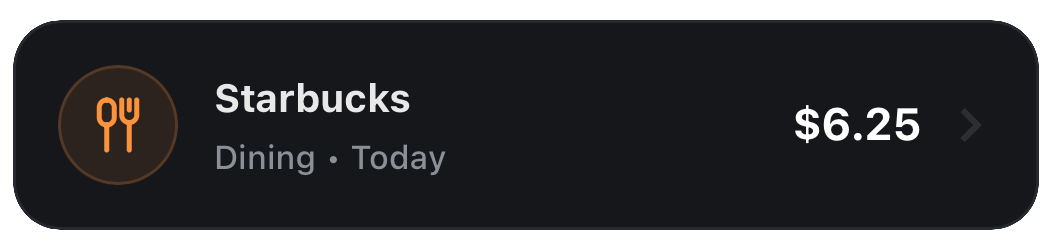
| Standard Expense | “Spent six dollars and fifty cents at Starbucks” | Amount: $6.50 • Vendor: Starbucks • Cat: Dining |
| Large Expense | “Twelve hundred dollars on rent” | Amount: $1,200.00 • Vendor: Rent • Cat: Housing |
| Income / Paycheck | “Received two hundred and fifty dollars from client project” | Amount: +$250.00 • Type: Income • Cat: Gross Income |
| Refunds & Credits | “Got a refund from Amazon for twelve dollars” | Amount: +$12.00 (Credit) • Vendor: Amazon • Cat: Refund |
Precision Tip: Saying “fourteen dollars and twenty cents” is far more reliable than saying “fourteen twenty”. If you ever notice an erroneous digit, modern apps allow you to tap the entry and correct the amount in two seconds.
When Voice Is the Wrong Tool (And What to Use Instead)
Voice logging is the fastest capture method for single-vendor transactions, but it is not universally ideal. Knowing when not to use voice prevents frustration:
- Noisy Environments: Construction zones, loud restaurants, or windy sidewalks can degrade microphone clarity and introduce transcription errors. I have tested Xingy to work pretty well in noisy environments so it generally shouldn’t be a too much of an issue.
- Social or Professional Privacy: You may not want to speak your financial amounts out loud in an open office, elevator, or public transit.
- Itemized Multi-Item Receipts: If you bought 25 individual items at a department store or wholesale club and want item-by-item line breakdowns, dictating each item by voice is tedious. In cases like these, with Xingy you can open the entered transaction log later, look at your receipt and update the notes section with each item and it’s price, so you can refer to it later.
Choosing the Right Tool for the Job
| Method | Best For | Typical Speed | Limitations |
|---|---|---|---|
| Voice Logging | 90% of daily transactions (coffee, dining, fuel, groceries, errands) | 3 – 5 seconds | Less ideal in loud environments or quiet public spaces |
| AI Receipt Scanning | Long itemized paper receipts, restaurant bills, hardware stores | 3 – 7 seconds | Requires clear lighting and physical paper/screen proof |
| Manual Typing | Complex category splits, private settings, editing past entries | 15 – 30 seconds | High friction; prone to logging procrastination |
| Bank Sync | Passive aggregate tracking | Automatic | Delayed transactions, frequent broken logins, credential privacy risks |
Related Guide: If you are looking to track your finances without handing over your online banking credentials, read our breakdown of Expense Trackers Without Bank Linking in 2026.
The Best Voice Expense Trackers in 2026
If you are looking to adopt voice expense tracking, several tools approach the workflow with different design philosophies:
1. Xingy.app (Web app, with iOS, Android coming soon)
Xingy is built specifically around instantaneous voice capture and financial privacy. Tap the microphone, state what you spent or received, and an AI inference engine parses the amount, merchant, and category type into an encrypted activity ledger. You can download your ledger at any time you'd like in PDF or CSV.
- ✓ Key Strengths: No bank linking required, zero audio retention (voice recordings are processed in memory and immediately deleted), built-in AI receipt scanner, integrated weekly grocery price drop monitoring, and recurring bill reminders and auto-logging.
- • Limitations: Requires internet connection for AI voice parsing; English language model optimized. *Offline logging and Multi-Language support coming soon.
- • Pricing: 30-day free trial (no card required); $4.99/mo (Plus) or $8.99/mo (Elite).
2. Apple Siri + Shortcuts (iOS)
For iPhone users willing to build their own automations, Apple’s built-in Shortcuts app can prompt for an expense and log it into Apple Notes, Numbers, or Reminders via Siri dictation.
- Key Strengths: Completely free, native to iOS, works hands-free via “Hey Siri”.
- Limitations: High setup friction (requires configuring your own Shortcuts logic), lacks automatic category intelligence, cannot intelligently parse merchant names from freeform speech.
- Pricing: Free.
3. VoiceSpend / Say (iOS App Store)
Standalone native iOS apps focused purely on speech-to-text logging.
- Key Strengths: Quick launch widgets on iOS lock screens.
- Limitations: Many lack cloud cross-device sync, receipt image storage, or historical visual analytics.
- Pricing: Free with in-app purchase tiers ($1.99 – $4.99/mo).
How Voice Logging Works in Xingy.app
In Xingy, voice logging is engineered as the central interaction model rather than a secondary add-on:
- One-Tap Microphone: From the Spending Center dashboard, tapping the mic activates immediate listening mode.
- Instant Natural Language Extraction: You speak naturally (e.g., “I spent forty-two dollars on groceries at Trader Joe’s”). The engine identifies:
- Amount:
$42.00 - Vendor:
Trader Joe's - Category:
Groceries(or custom categories you have created) - Type:
Expense
- Amount:
- Zero Audio Retention Privacy: Audio prompts are transcribed transiently in real time and immediately destroyed. Voice prompts are never saved, stored, or used for model training.
- Real-Time Verified Ledger: The entry immediately populates your Activity Ledger and updates your dynamic monthly budget progress ring. You can tap the entry at any point to attach a receipt photo, switch payment methods (Cash, Credit Card, Debit Card), or add notes.
4 Practical Tips to Make Voice Tracking a Habit
- Add the App to Your Mobile Home Screen: Install your tracking app as a standalone progressive web app (PWA) or native widget so the microphone is accessible within one tap of unlocking your screen.
- Log at the Point of Sale: Make it a rule to speak your transaction as soon as you step outside the vendor or return to your car. Logging immediately prevents evening memory fatigue.
- Use Consistent Denominations: Train yourself to say “dollars and cents” on small purchases to eliminate transcription ambiguities.
- Keeping Categories Simple (Mostly): You can limit your core expense categories to 8–12 broad buckets (Housing, Groceries, Dining, Utilities, Transport, Shopping, Health, Entertainment). Over-fragmented categories can make logging mentally exhausting. But you have the option of creating Custom Categories for special items you’d like to keep track of separately, like “Pool Chemicals”, “Comic Books”, etc.
Frequently Asked Questions
Does voice tracking require an active internet connection?
Most modern AI voice parsing models run via cloud inference engines to deliver sub-second natural language extraction. While basic speech-to-text dictation exists on device keyboards offline, AI extraction (which isolates the amount from the merchant and selects the category) requires a network connection. *Offline mode and syncing is coming soon.
Is voice logging private?
It depends on the application’s data policy. You should confirm whether your chosen provider retains audio recordings. In Xingy, voice prompts are strictly transient: audio is transcribed in temporary memory to generate your encrypted log entry and is immediately purged with ZERO audio retention.
Can voice trackers handle income and refunds?
Yes. Intelligent natural language engines distinguish between expenses, gross income, and refunds based on phrasing (e.g., “Got paid” vs. “Got a refund from” vs. “Spent”). Xingy does this.
Start Logging Expenses in Seconds
If manual typing has stalled your budgeting in the past, voice logging removes the friction that causes tracking fatigue. Trust me, it’s much easier to keep track of expenses when you can log them in an instant, rather than manually typing everything in by hand, or depending on risky bank connections that require you to hand over your sensitive bank credentials to third-party providers.
Try Xingy.app free for 30 days—no credit card required—and experience the speed of voice-first personal finance.