If you want an expense tracker without bank linking, you have more choices than you might expect. Some apps are manual by design, some treat bank syncing as a required or optional extra, and one you can run on your own server. Maybe you’re replacing Mint, which shut down in early 2024, or you just don’t want to hand a third party your bank login credentials.
Full disclosure: I’m the solo developer of Xingy, and it’s on this list. I’ve held it to the same objective format as the others, including where it might fall short for your needs. Prices below were checked in October 2026 and can change, so confirm on each app’s site before you subscribe.
Quick comparison
| App | Bank linking | Free plan | Paid from |
|---|---|---|---|
| Goodbudget | Optional (Premium, US banks) | Yes: 20 envelopes, 2 devices | $10/month ($80/year) |
| Monefy | None | Yes (basic single account) | ~$2.99 to $9.99 (varies by app store) |
| Spendee | Optional (Premium) | Yes: 1 wallet, 1 budget | Plus $1.99/month; Premium $5.99/month ($35.99/year) |
| YNAB | Optional | 34-day trial, no free plan | $14.99/month ($109/year) |
| Actual Budget | Optional, you set it up | Free and open source | Free (you host the sync server) |
| Xingy | None | 30-day free trial (no card required) | Plus $4.99/mo; Elite $8.99/mo ($89/year) |
| Spreadsheet | None | Free | Free |
Why skip bank linking?
There are three common reasons people avoid bank connections:
- Security and privacy: You don’t want your banking credentials stored by aggregators or your financial history monetized for target ads. In the age of AI, cyber criminals are getting much more sophisticated and using AI allows for much smarter ways to steal your credentials.
- Reliability: Bank sync breaks frequently. Re-authenticating dropped connections, duplicate transactions, and pending charge errors are common complaints across budgeting app app-store reviews.
- Mindfulness: When transactions import silently in the background, you rarely pay attention. Logging purchases yourself, in real time, forces you to pay attention to where your money goes.
There’s a real trade-off, though. Nothing arrives automatically, so if you forget to log a purchase, your ledger drifts. The best manual trackers though, still require you to spend extra time by logging things by hand, which causes people to drop the practice of logging expenses entirely.
So that’s why I created Xingy. It only takes a few seconds to pull up the app and speak your expense, done. And you can do it at the store, in your car or when you get home. So keep speed in mind as you compare. You can try it for free for 30 days, no credit card required at Xingy.app.
Goodbudget: best for envelope budgeting
Goodbudget is a digital version of the traditional cash envelope method: you divide your income into category envelopes and assign each expense to one. Its free plan relies on manual entry, or you can manually import QFX or OFX bank export files.
- Good at: Envelope budgeting done deliberately, and sharing a budget across multiple devices for couples or households.
- Watch out for: The free plan is capped at 20 envelopes, one account, two devices, and one year of history. Bank sync exists only on the paid tier and only for US institutions.
- Price: Free, or Premium at $10/month ($80/year).
Monefy: best for simple, offline tracking
Monefy is built around tap-and-go manual entry: tap a plus sign, enter an amount, tap a category icon, and you’re done. It works offline and has no bank integration.
- Good at: Manual entry and a clean visual circle interface that takes zero learning curve.
- Watch out for: Reporting is basic. The free version is limited to one account and one currency. Multi-device cloud sync and custom categories sit behind paid in-app purchases.
- Price: Free to start. Paid Pro upgrades vary by app store platform.
Spendee: best for visuals and shared wallets
Spendee leans heavily on colorful charts and category breakdowns. Its entry-level paid plan is aimed at couples or roommates who track cash flow together manually.
- Good at: Clean infographics that make spending patterns easy to visualize, and low prices for shared manual tracking.
- Watch out for: The free plan gives you just one cash wallet and one budget. Bank sync is reserved for Premium, and user reviews frequently cite bank connection drops.
- Price: Free; Plus at $1.99/month ($14.99/year) for unlimited manual wallets and shared budgets; Premium at $5.99/month ($35.99/year) adds bank sync.
YNAB: best if you want a strict budgeting method
YNAB (You Need A Budget) is more of a financial philosophy than a tracker, built around the zero-based budgeting rule of “giving every dollar a job.” You can use it entirely via manual entry; bank sync is optional.
- Good at: A comprehensive method for planning your money ahead of time, supported by a large community and educational courses.
- Watch out for: It is the most expensive option on this list and offers no free tier beyond its 34-day trial. The methodology takes time to master and is overkill if you just want a fast spending log.
- Price: 34-day free trial, then $14.99/month or $109/year.
Actual Budget: best for people who want full control
Actual Budget is a free, open-source budgeting tool with a local-first architecture: your budget data lives on your device and works offline. If you want multi-device sync, you deploy and manage your own lightweight server.
- Good at: Total data ownership and privacy, with zero subscription fees and full envelope budgeting. It imports files easily from other applications.
- Watch out for: Setting up a server or Docker container requires technical comfort. Optional third-party bank sync services like SimpleFIN cost extra and require manual setup.
- Price: Free and open source. Self-hosting costs vary.
Xingy: best for fast logging with voice and local grocery item price tracking
Xingy is a web app installable straight from your browser to your phone’s home screen as a Progressive Web App (PWA). I built it around two specific needs: logging an expense should take three seconds, and you shouldn’t have to link your bank to get smart financial intelligence.
- Fast logging: Log expenses or income by voice (“I spent ten dollars at Target”), use a quick manual form, or snap a photo of a paper receipt or invoice screen for automated extraction.
- Verified ledger & Quick View: Review spending in a full activity ledger or switch to the Quick View timeline to audit expenses against receipts. Mark repeat bills to auto-log each month with a 3-day advance notice.
- Grocery price radar: Build a list of 3 to 10 supermarket staples by typing or scanning the UPC barcode. Once a week (Wednesdays), Xingy re-checks local store shelf prices based on your 5-digit zip code and alerts you if a price dropped or is cheaper nearby.
- Spending charts & AI Coach: Category breakdowns and multi-month budget performance without complex spreadsheets.
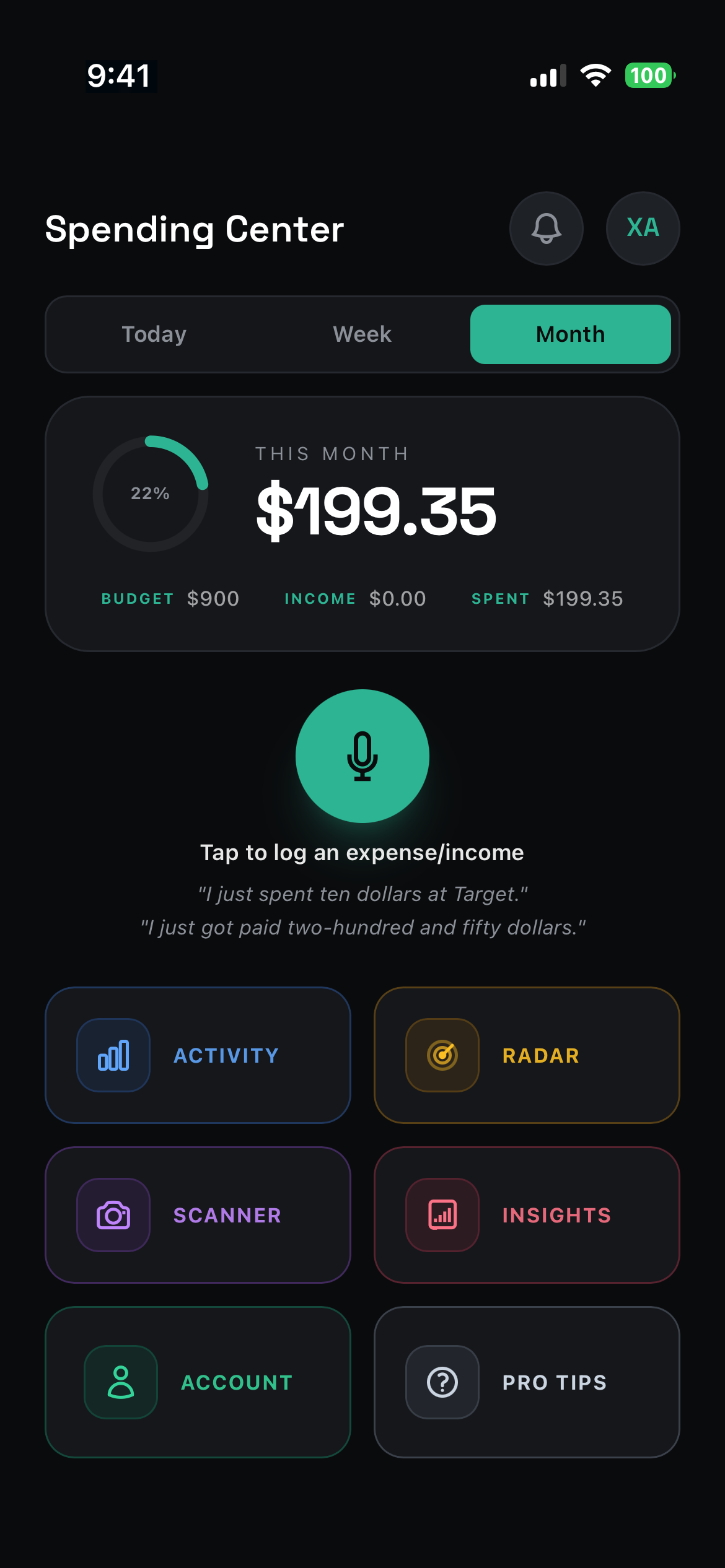
Xingy Spending Center: Tap the mic, speak your purchase, and it's logged.
Where it might fall short: Xingy is a newer tool with a shorter track record than the others. It is installable as a browser PWA rather than through the Apple or Google app stores (coming soon). Grocery price discovery is currently focused on major US supermarket chains.
A note on data: No bank linking does not mean zero data. Your entries are stored in your encrypted cloud account so they sync across your devices. Voice inputs are transcribed transiently in memory and deleted immediately. Audio prompts are never saved or stored. What Xingy never asks for, stores, or accesses is your bank account login.
Price: 30-day free trial with no credit card required. Paid plans start at $4.99/month (Plus) and $8.99/month or $89/year (Elite). Try it at https://xingy.app.
A spreadsheet: free and flexible
A Google Sheet or Excel workbook never touches your bank, costs nothing, and can be shaped to your exact needs. The downsides are that mobile entry is awkward, you must build formulas and charts yourself, and maintenance fatigue causes many people to abandon it.
How to choose
- Want envelope budgeting for free? Try Goodbudget.
- Want the simplest offline tracker? Try Monefy.
- Want colorful charts or to track with a partner? Try Spendee.
- Want a strict budgeting system and don’t mind paying? Try YNAB.
- Want complete open-source ownership? Try Actual Budget.
- Want voice logging, receipt extraction and storage, and a grocery price radar? Try Xingy.
Frequently asked questions
Can I track expenses without linking my bank account?
Yes. Every app in this roundup works without a bank connection, and tools like Monefy and Xingy never connect to banking APIs.
Can I still import bank statements without linking credentials?
Yes. Goodbudget and Actual Budget both support manual file uploads (CSV, QFX, OFX) downloaded directly from your bank’s website.
Is manual tracking too time-consuming?
It is if each entry requires opening multiple menus and typing by hand. That is why voice logging and quick forms are critical: log immediately after paying, stick to 8–10 high-level categories, and automate fixed recurring bills.
Thanks for reading!
Prices and features checked October 2026 from official company websites. [1] Source: Bank of America Security Center. This post is general educational information, not financial advice.